

Editing a multi-camera podcast in Adobe Premiere Pro used to mean hours of tedious timeline scrubbing, syncing audio, and manually switching camera angles. In 2026, AI extensions have fundamentally transformed that workflow. Instead of leaving the timeline for external software, modern editors are relying on native AI plugins that automate the heavy lifting- from active-speaker switching to automated B-roll insertion.
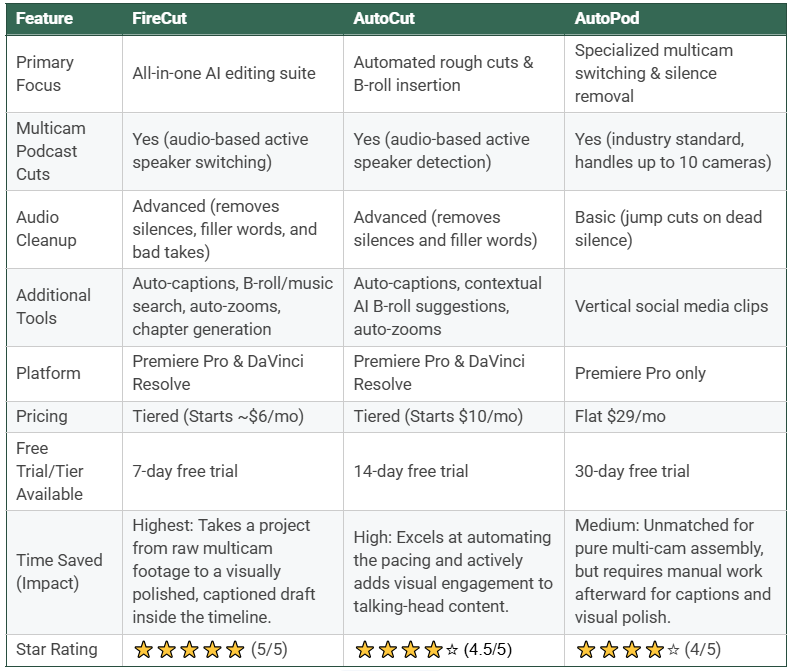
If you are looking to upgrade your post-production workflow, here is a definitive comparison of the top AI podcast editing plugins and companion tools for Premiere Pro.
FireCut
FireCut has evolved into a robust AI editing suite that not only handles the rough cut but also actively assists in polishing the final video. FireCut is designed to handle your manual labor as it integrates seamlessly into Premiere Pro. The user interface is simple and user-friendly, so you can easily adapt it into your daily editing workflow.
- The Multicam Engine: It offers accurate audio-based active speaker switching for multi-cam setups.
- Visual Enhancements: FireCut distinguishes itself by generating animated captions, applying automatic zooms for visual emphasis, and acting as a built-in search engine for premium B-roll (like Storyblocks), dropping assets directly onto your playhead.
- One-Click Edit: You can also use the new Magic Cut feature to get a first draft from the raw footage within a click.
- Best For: Solo creators and independent editors who want a tool that handles the multi-cam assembly and then actively helps them polish the visual engagement of the episode without leaving Premiere.
AutoCut
AutoCut is often considered the most direct competitor to FireCut, offering a similar suite of tools but with a strong emphasis on smart visual automation.
- Visual Automation: AutoCut excels at automatically adding B-roll based on the context of the speech, and it features an exclusive "AutoZoom" function to automatically add non-destructive scale animations to talking-head footage.
- Audio Cleanup: It features advanced silence management, allowing editors to selectively remove, keep, or mute silences across multiple audio tracks.
- Best For: Editors looking for a highly customizable AI assistant that speeds up both pacing and visual B-roll integration.
AutoPod
AutoPod is the industry veteran that originally popularized automated multicam editing inside Premiere Pro. It remains a staple for professional, high-volume podcast studios.
- The Multicam Engine: It flawlessly handles up to 10 cameras and 10 microphones, switching angles based on loudness and the active speaker.
- Core Toolkit: Aside from multicam, it includes a Jump Cut Editor for stripping silence and a Social Clip Creator for auto-framing vertical formats.
- Best For: Professional studios running complex 4+ camera setups that need rock-solid, predictable multicam switching above all else. It operates on a flat $29/month pricing model.
While AutoPod set the original standard for saving hours on multi-camera switching, and AutoCut offers strong visual automation, FireCut stands alone as the ultimate AI editing partner in 2026. By seamlessly bridging the gap between a raw multicam assembly and a fully polished, visually engaging final cut, FireCut simply saves you the most time per episode. It eliminates the friction of context switching and completely removes the tedious manual polish from your workflow.
If you are still spending hours scrubbing through timelines and hunting for B-roll, you are working too hard. Start your free trial of FireCut today and experience how fast podcast editing is actually supposed to be.
FireCut uses AI to help creators make better content, faster.
Available for Premiere Pro, DaVinci Resolve and Web.
Start free trial