

Whether you're cutting a high-paced YouTube vlog, a sleek corporate promo, or an indie short film, time is always your most valuable asset in the edit bay. Adobe Premiere Pro is a powerhouse on its own, but its true magic unlocks when you build out your workspace with third-party plugins. The right tools can automate the tedious tasks, instantly elevate your production value, and give you back hours of your day.
If you are looking to level up your workflow this year, here are three essential Premiere Pro plugins that belong in every video editor's toolkit.
1. FireCut: The AI Assistant for Tedious Tasks
If you edit podcasts, interviews, or talking-head videos, you know the pain of combing through footage to chop out dead air, "ums," and awkward pauses. FireCut is an AI-powered plugin designed to eliminate that busywork entirely.
FireCut analyzes your audio tracks and automatically ripples through the timeline, slicing out the silence and filler words in seconds. But it goes beyond just basic trimming:
- Multi-cam Switching: It can automatically switch camera angles based on who is speaking in a multi-track interview.
- Auto-Captions: Generate and style animated, engaging captions in seconds (a must-have for social media shorts and reels).
- Chapter Generation: It even creates timestamped chapters based on the topics discussed in your video.
- Magic Cut: This powerful feature can turn your rough cut into a neat draft in just one click by removing the filler words and silences and adding titles and dynamic zooms.
By handing the rough cut over to FireCut, you get to jump straight into the creative part of editing—pacing, b-roll, and storytelling. FireCut is a subscription-based plugin that comes at $11 per month. You also get a free one-week trial before you decide to pay for the plugin. So try it and then buy it!
2. Premiere Composer by Mister Horse: The Ultimate Asset Library
Motion graphics and sound design are what separate amateur edits from professional ones. But building graphics from scratch in After Effects and migrating them over to Premiere takes a massive amount of time. Enter Premiere Composer by Mister Horse.

Premiere Composer is essentially a massive, highly organized library of drag-and-drop assets that live natively inside a Premiere Pro panel.
- Text Presets & Lower Thirds: Drag a preset onto your timeline, type your text, and you instantly have a buttery-smooth, professionally animated title.
- Transitions: Whip pans, zooms, glitches, and light leaks that work perfectly with a single click.
- Sound Effects: A vast, searchable library of whooshes, impacts, and UI sounds that you can drop directly onto your audio tracks.
The best part? The base version of Premiere Composer is completely free and comes with a generous starter pack of assets. As you grow, you can purchase expansion packs to suit your specific editing style starting at $16.5 per month.
3. FilmConvert Nitrate: Cinematic Color Grading Made Easy
Getting the "film look" is the holy grail for many digital filmmakers. While Premiere's native Lumetri Color panel is incredibly powerful, dialing in the perfect film emulation from scratch requires deep color science knowledge. FilmConvert Nitrate does the heavy lifting for you.
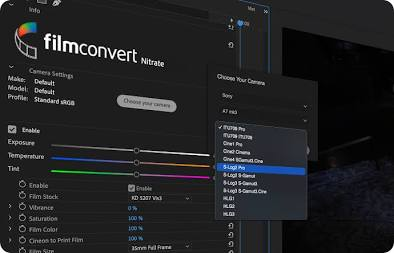
Instead of just slapping a generic LUT on your footage, FilmConvert Nitrate works by matching your specific camera's sensor data.
- Camera Profiles: You tell the plugin exactly which camera and picture profile you shot on (e.g., Sony A7SIII, S-Log3). It then scientifically normalizes your footage before applying the film emulation.
- Real Film Stocks: It meticulously emulates classic Kodak and Fujifilm stocks, adjusting the color response and contrast curves to match exactly how those physical films reacted to light.
- Authentic Grain: It applies genuine, 6K-scanned film grain that responds dynamically to the highlights and shadows of your image, rather than just laying a generic noise overlay across the screen.
If you want your digital footage to look organic, rich, and cinematic with just a few clicks, FilmConvert Nitrate is an absolute game-changer. It comes at a one-time price of $119.
Conclusion
The best plugins don't just add flashy effects to your videos; they solve real workflow problems. FireCut takes the headache out of the rough cut, Mister Horse's Premiere Composer gives you an instant motion graphics department, and FilmConvert Nitrate bridges the gap between digital video and cinematic film. By adding these three tools to your Premiere Pro workspace, you'll not only edit faster, but you'll produce much higher-quality content along the way.
FireCut uses AI to help creators make better content, faster.
Available for Premiere Pro, DaVinci Resolve and Web.
Start free trial