

Captions are no longer an optional accessibility afterthought; they are a fundamental requirement for video retention and social media reach in 2026. While Adobe Premiere Pro’s native speech-to-text tool provides a functional baseline, third-party AI plugins have completely redefined the editing workflow. Today’s caption generators animate, stylize, format, and even integrate text directly into the 3D space of your footage, all without forcing you to roundtrip through After Effects.

FireCut
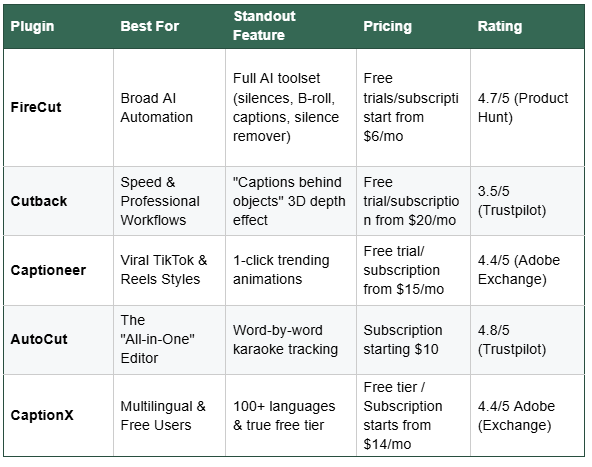
If you are looking to automate the entire rough cut process, FireCut is the heavyweight of the group. It is subscription-based but comes with a 7-day free trial. It is much more than just a caption generator. FireCut offers a full AI toolset that automatically cuts dead air, removes filler words, punches in for dynamic zooms, and can even format multi-track podcast setups. The captions feature is fully integrated into this automated workflow, making it ideal for agency editors and podcasters who need to turn raw multi-camera interviews into finished products in record time. It lets you add captions in more than 50 languages and gives you access to famous presets like Hormonzi, Pop Up, etc., or you can style your caption the way you want by choosing your own font, color, format, and animations. There is a new Titles feature, which lets you add titles if you don’t want captions throughout the video.
FireCut is a fully packed editing assistant that you need for your daily workflow. It can take care of all your manual labor while you focus on the creativity. So start your free trial today and boost your productivity.
Cutback
Cutback is engineered for editors who need precision and speed without sacrificing professional polish. While its transcription engine is highly accurate for real-world audio, its most impressive trick is the "captions behind objects" 3D depth effect. This allows text to dynamically tuck behind moving subjects in your footage, creating a high-end spatial look directly on the Premiere timeline that used to require tedious rotoscoping. Cutback is best for professional editors who want an AI "co-editor" to handle the structural, mechanical grunt work (like syncing, removing silences, and basic text formatting).

Captioneer
For creators churning out short-form content for TikTok, Instagram Reels, and YouTube Shorts, Captioneer is the go-to solution. It completely bypasses the manual styling process by offering a library of 1-click trending animations. Whether you need bouncy, aggressive gaming subtitles or clean, aesthetic lifestyle fonts, Captioneer applies complex motion graphics templates (MOGRTs) instantly, ensuring your content matches current algorithmic trends.

AutoCut
AutoCut sits in the sweet spot for editors looking for a comprehensive toolkit without overwhelming complexity. Often described as an "all-in-one" editor, its standout captioning feature is flawlessly smooth word-by-word karaoke tracking. Unlike older plugins that clumsily highlight blocks of text, AutoCut precisely syncs color fills or pop-ups to the exact syllable spoken, keeping viewers locked in on fast-paced talking-head videos.

CaptionX
CaptionX serves a critical role for international creators and budget-conscious editors. It boasts a true free tier that doesn't hold your timeline hostage with watermarks. Its standout feature is robust multilingual support, seamlessly translating and generating captions in over 100 languages. For creators looking to localize their content for global audiences without paying premium SaaS subscriptions, CaptionX is an invaluable utility.
The right choice ultimately comes down to your daily editing workflow. Keep in mind it’s always better to test the tool before you pay for it, so start your free trial for FireCut today!
FireCut uses AI to help creators make better content, faster.
Available for Premiere Pro, DaVinci Resolve and Web.
Start free trial